
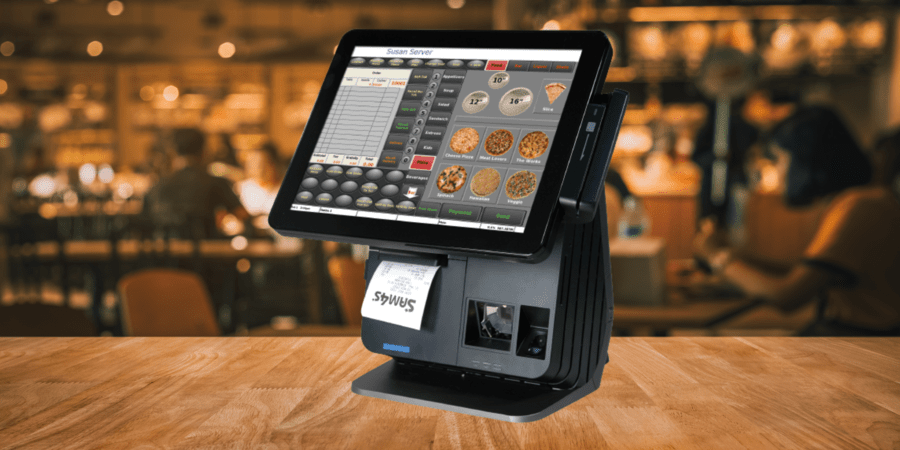
A total POS system for restaurants includes software with the right features for the operation, durable, reliable hardware, and online ordering integration. Restaurants can also operate more efficiently with self-service ordering kiosks, order- and pay-at-the-table systems, a kitchen display system, and reliable data management.
A modern point of sale (POS) system for restaurants is much more than a ticket system and cash register. A POS system for restaurants has become the nerve center of the entire operation, connected to every aspect of the business, from order management and payments to service beyond the counter. If you’re ready to upgrade your technology, consider these seven things to make sure you have a complete POS system tailored to your business.
7 Essentials of a POS System for Restaurants
1. Improve Operations with the Right POS Software
The ideal POS system for restaurants begins with POS software. It should be customizable so it supports the unique way your restaurant operates. For example, POS software for restaurants should provide easy access to menu items when taking orders or updating prices and availability. User-friendly interfaces are vital for efficient operations and fast training, which saves time and money, especially in an industry with high turnover.
The software’s design is also important. Consider an embedded POS solution that’s preloaded onto dedicated hardware. Since nothing else can be downloaded from or uploaded to the devices, these systems are secured against viruses and hacking without the cost of additional anti-virus or security programs. Plus, employees can focus on work tasks without the potential distractions of other applications running on the terminal.
A POS system for restaurants should also have 100% redundancy, meaning that your data is stored across the entire system so that if one terminal goes down, your business can keep operating without data loss.
2. Choose POS Hardware That’s Compatible and Durable
Once you’ve found the right software, you need the hardware to run it. The main component is, of course, the POS terminals or tablets, with a touchscreen interface for ease of use and faster order entry.
Peripherals will vary depending on your restaurant’s needs but can include:
- Receipt and Kitchen printers
- Payment terminals
- Barcode scanners for QSR or grab-and-go items
- Scales for self-serve items such as frozen yogurt or sushi that you sell by weight
Working with one POS provider will give you the confidence that you are using a total POS system for restaurants with hardware and software that all work together and give you the most uptime.
You also need to make sure you choose durable POS hardware. POS hardware for restaurants must work reliably in hot, humid environments and during peak times. Make sure you invest in POS hardware that will last.
3. Include an Easy Way to Accept Online Orders
One option that has gone from “nice to have” to “must have” is online ordering integration. If you’re only taking orders in the restaurant, you’re severely limiting your potential sales. Customers now expect and even prefer the availability and convenience of online ordering via website or third-party platform for pickup or delivery.
Online order integration with your POS software streamlines processes and increases accuracy. Orders go directly to the POS system and are instantly communicated to the kitchen through your kitchen display system (KDS) or kitchen printer. Since no labor is required for communication from the front to the back of the house, your staff can focus on preparing food and serving customers.
4. Streamline Payments with Order and Pay at the Table
Restaurants can enhance in-house dining experiences by providing all services tableside. Servers can use mobile devices to place orders, increasing speed and accuracy. Your team won’t have to write down orders and run back to a busy terminal to enter them.
When customers finish their meals, a pay-at-the-table solution allows customers to pay in a single step, even when combining or splitting tabs. Tableside payments can expedite turnover and make customers feel more secure, since their cards never leave their possession. The National Restaurant Association (NRA) reports that 53% of millennials and 50% of Gen Z customers would choose a restaurant that offers a pay-at-the-table option. Mobile devices can also assist with ordering and payments in outdoor dining areas, at curbside pick-up, or even at the customer’s front door for a delivery.
5. Meet the Demand for Self-Ordering Kiosks
A good POS system for restaurants will give you the option to offer self-service ordering. Fast-casual establishments and QSRs, in particular, benefit from this option. Kiosks allow customers to place their own orders and make payments, which can help solve some of the challenges created by ongoing labor shortages. Self-service ordering increases accuracy and decreases food waste because the customers select exactly what they want, including modifiers. In addition, self-service orders tend to be larger.
The self-service trend is gaining momentum. Deliverect reports that 91% of Gen Z customers prefer self-service, indicating that it will be in demand for years to come.
6. Improve Communication with a Kitchen Display System
Another key element of a complete POS system for restaurants is a kitchen display system (KDS). A KDS sends orders directly to the kitchen from a terminal, tablet, or online orders, saving valuable time. This option eliminates the human errors introduced by lost or illegible paper tickets, and it saves the cost of supplies associated with paper ticketing. The system can prioritize orders according to required prep time or when they enter the queue, and it sends orders to the correct prep stations, ensuring that all parts of an order are ready at the same time.
7. Manage Data with a Hybrid-Cloud Headquarters
The final essential element of a total POS system for restaurants is effective data management through a hybrid-cloud headquarters solution such as RHQ. This option allows your POS system to run independently and keep all sales data stored locally until it can communicate and send information to RHQ. You won’t have any downtime due to Internet outages. RHQ provides a centralized location from which you can view reports and get front-end data at any time, accessible from any Internet browser. Sales and labor information are at your fingertips, enabling you to make better-informed business decisions.
Integration is the Key to a Total POS System for Restaurants
Choosing each part of your POS system to meet your restaurant’s needs is important, but you need to make sure that all components are connected and share data. Integration streamlines operations, decreases labor demand, saves costs, and provides comprehensive data. Ultimately, a connected system enables efficiency that leads to the best dining experiences for your customers, which benefits your bottom line. NCC’s local reseller partners are experts at helping restaurants choose the right components for POS systems and making sure they’re seamlessly integrated. Contact us for an introduction today!